













تابعنا
Tutorials
Edit main elements in one place (in the Design view). Changes made here will be reflected throughout the website.
Change Here
Editing Fullscreen Menu Items.
1. Double-click on the symbol located on the right containing menu items.
2. Once inside the symbol, select each menu item by clicking on it, and adjust its text, link, and background images using the "Properties" panel visible on the right.
3. If you don't need any of the items, simply select and delete them. If you'd like to add more items, just copy and paste the last one, and adjust its properties accordingly.
Change Here
Changing the Logo in the Menu.
1. Double-click on the symbol located on the right containing the logo.
2. Once inside the symbol, replace the logo image with your desired image in the "Settings" panel on the right.
.png)
Change Here
Changing the Text of the Start Now Button.
1. Double-click on the symbol located on the right containing the text.
2. Once inside the symbol, edit the text content as required.
Change Here
Changing the Text of the Submit Message Button.
1. Double-click on the symbol located on the right containing the text.
2. Once inside the symbol, edit the text content as required.
Info
Removing the Cart Button From the Menu.
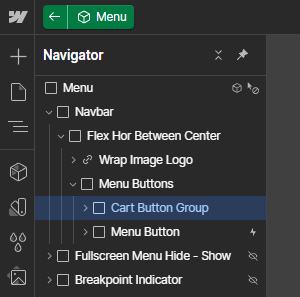
1. Double-click on the "Menu" symbol to go inside it.
2. Using Navigator panel on the left, select the "Cart Button Group" element, and then delete it.
Info
Editing Template Colors Through the Variables Panel.
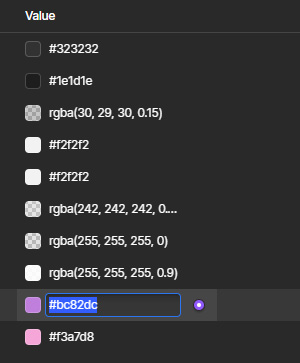
1. While in the Designer view, locate the Variables button on the left side of the screen and click it.

2. In the Variables panel, modify individual colors in the "Value" column by either clicking on the color's swatch icon or entering the value directly.
Info
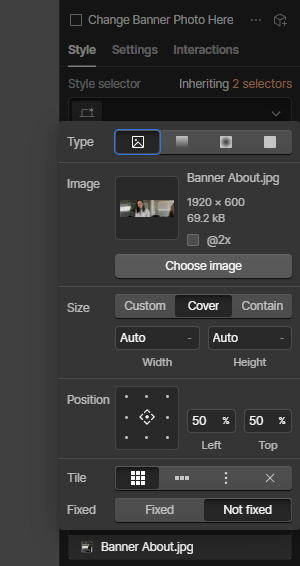
Changing the Banner Photos on Inner Pages.
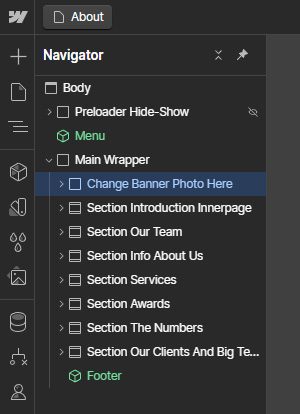
1. While in the Designer view, navigate to the page where you want to change the banner photo.
2. Using Navigator panel on the left, select the "Change Banner Photo Here" element.
3. Next, in the Style panel on the right side of the screen, go to the "Backgrounds" section, and click on the banner image.
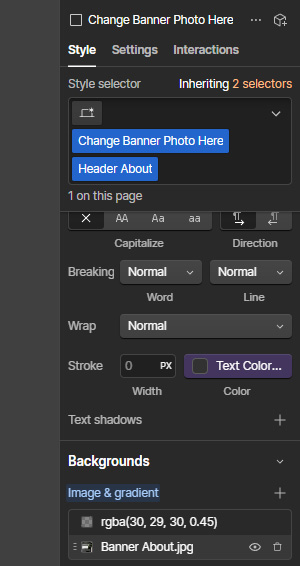
4. In the pop up window that opens, you can replace the image and adjust its settings.
Info
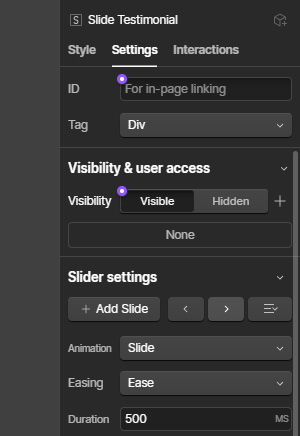
Editing Our Clients Slider.
1. While on any page with the slider, double-click on the "Our Clients" symbol to go inside it.
2. Now, you can edit content of any slide directly.
3. To access slides that are outside the screen edge, use the arrow buttons in the "Slider Settings" section of the "Settings" panel (on the right side of the screen).
Still need assistance?
If you have any questions regarding editing the template or its functionality that aren't addressed in the tutorials above, please don't hesitate to reach out. We're here to help! Simply contact us at silverrost.webflow@gmail.com
تقيمات طلابنا
إعرف أكثر عن قصص نجاح طلابنا

Ayman
These people are amazing, helped me with all my university admissions papers everything, gave me all the answers and help choosing my university and made everything easy I heavily recommend these guys 🙌🏼❤️

صفاء
Chau supported me both before and after my arrival in Cyprus, assisted me with all procedures and my university registration. They helped me adapt easily to life on the island and made the whole process smooth and stress free.

جلال
المكتب ممتاز والعاملين القابلتهم كانوا كويسين ابتداء من الاستقبال والتسجيل وباقي الخدمات. اضافه على ذلك الموظفين بيحاولوا يساعدوا الطالب ويقدموا ليه خبرتهم والنصائح الممكن يستفيدو منها كانت تجربه جميله وشكرا 🤍

عبد العزيز
I,m very pleased to deal with chau . My journey with them began from the university application stage until the completion of the procedures and accommodation. Honestly, from my personal experience, I have never encountered anyone kinder or more helpful in such situations.
أيمن
These people are amazing, helped me with all my university admissions papers everything, gave me all the answers and help choosing my university and made everything easy I heavily recommend these guys 🙌🏼❤️
صفاء
Chau supported me both before and after my arrival in Cyprus, assisted me with all procedures and my university registration. They helped me adapt easily to life on the island and made the whole process smooth and stress free.
جلال
المكتب ممتاز والعاملين القابلتهم كانوا كويسين ابتداء من الاستقبال والتسجيل وباقي الخدمات. اضافه على ذلك الموظفين بيحاولوا يساعدوا الطالب ويقدموا ليه خبرتهم والنصائح الممكن يستفيدو منها كانت تجربه جميله وشكرا 🤍
عبد العزيز
I,m very pleased to deal with chau . My journey with them began from the university application stage until the completion of the procedures and accommodation. Honestly, from my personal experience, I have never encountered anyone kinder or more helpful in such situations.
أهلا بك
أفكار جديدة
أهلا بك
أفكار جديدة
أهلا بك
أفكار جديدة
أهلا بك
أفكار جديدة
أهلا بك
أفكار جديدة
أهلا بك
أفكار جديدة
أهلا بك
أفكار جديدة
أهلا بك
أفكار جديدة